

MissionBridge
Missionary & org sites
To missionaries without a website,
we open a window for your ministry
Many missionaries are so full with ministry that a website feels out of reach. Talking with supporters, recording the work, a way to give — all needed, but building and managing them is a burden of time, skill and cost. MissionBridge takes on everything from building to domain and management, so you can focus only on your calling.
This very MissionBridge site was made the same way. From building to management, the fiddly parts are on us.

Have you felt hesitant to put it out there?
“Does God’s work really need to be shown?” Many missionaries have said the same thing to us. That hesitation, we think, is the very heart that has guarded a ministry for years. A website is never a place to show off ministry or to elevate yourself. But quietly letting people know who we are and what path we walk is, less a boast, and more a small greeting to those walking alongside us.
Not a boast, but reassurance
A small window where those who pray and give can be reassured that this ministry is doing well.
A quiet steward's heart
Honestly sharing how entrusted prayers and gifts bear fruit is, we believe, not a burden but another name for gratitude.
An extension of the missionary letter
The apostle Paul shared his heart with churches by letter. A website is simply a window where that letter reaches a little farther, in today's language.
You don’t need to feel hesitant
“Let your light shine before others, that they may see your good works and glorify your Father in heaven.”
A website isn’t for showing yourself off — it’s a door quietly opened so that more people can take part in what God is doing.
Why a missionary needs a website
Even a full day of ministry gets lighter and steadier with a single website behind it.
Scattered news, in one place
Gather news, prayer requests and letters — spread across chat, texts and email — behind a single link.
A trusted donation window
An official site raises trust in support requests. Share how to give, clearly and tidily.
A record and archive
Keep photos, videos and letters from fading with time — stored and organized for good.
Korean–English bilingual
Home supporters and the field, on one site. Tell your story without a language barrier.
Reachable anywhere
Supporting churches and members meet the field live, on desktop or mobile.
Zero tech burden
Domain, hosting, security and updates — MissionBridge handles it all. You focus on ministry.
Quietly proving you’re real
These days a logo, a testimony — even a whole church — can be made in seconds. As the line between real and fake blurs, an official website that honestly shows your ministry is real matters more, not less.
A trusted home that supporters, young people and first-time visitors can search and confirm — ‘they’re really here’ — becomes a point of reassurance amid the noise. A website isn’t about showing off; it’s a fence that protects the people walking with you.
- A real ministry, verified
- Reassurance amid impersonation
- A searchable official home
Wherever the field is,
we go with you
At home or abroad — as long as there's internet, we consult and build online. Time zones and distance are no problem.
Not just individual missionaries
Associations, mission societies and denominational mission boards, too — we help you gather scattered missionaries and their ministry into one place to manage.
Missionary roster & archive
Member missionaries' profiles, ministry and prayer letters, gathered by region into one searchable archive.
Unified news & letters
Scattered updates from many missionaries, gathered into one channel and sent to supporters regularly.
Unified giving
Guide and manage both organizational and individual giving, transparently, in one place.
Events · retreats · sending
Share regular meetings, retreats and sending news with members and supporters in one place.
Korean Church Philippine Mission History Hall
Fifty years from the first sending in 1974 — missionaries from 22 denominations and agencies, their fields, and the sayings of the elders, gathered in one place for the next generation. This is what an organization’s archive can look like.
Open the History Hall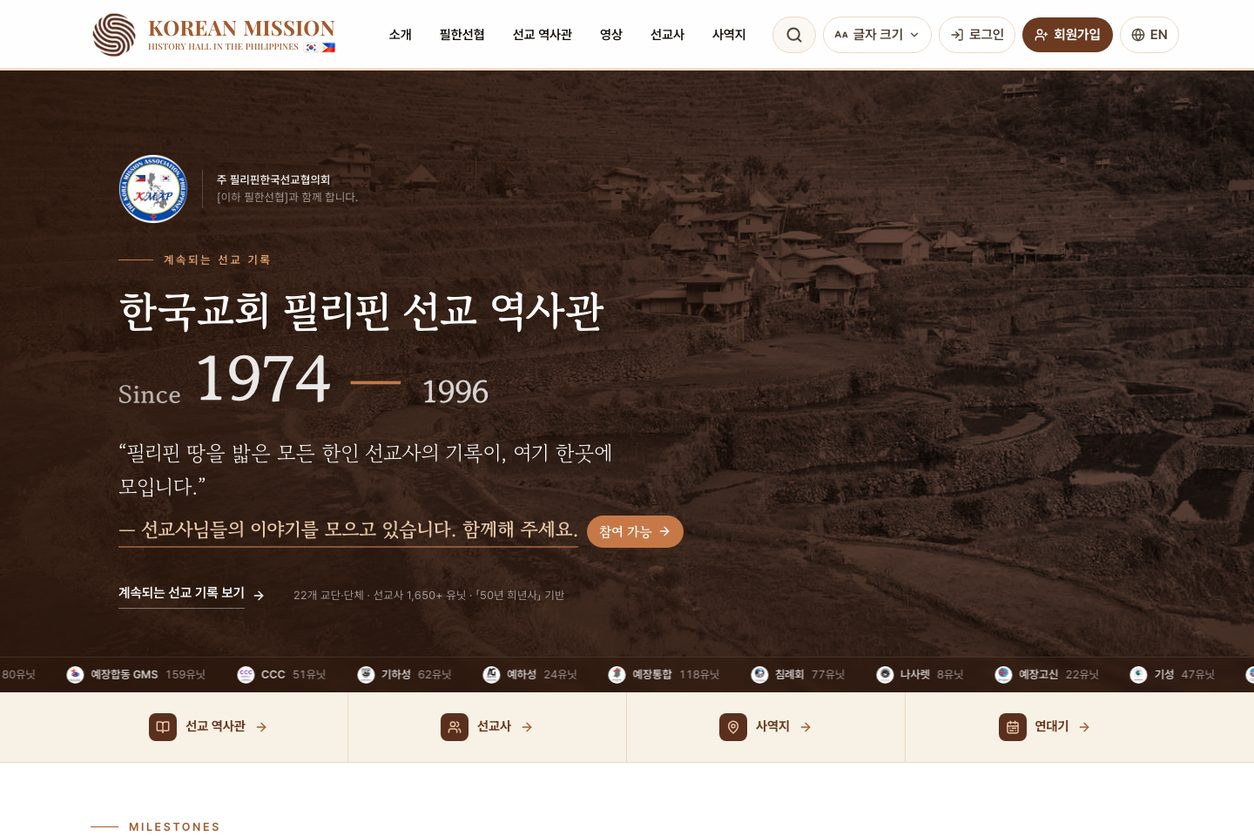
This is the website we build for you
- Responsive website (auto PC/mobile)
- Space for letters & news
- Donation info page (account, recurring)
- Photo & video gallery
- Korean–English bilingual
- Domain registration & connection
- Ongoing management & updates
- Security, backup & fixes
Missionary website
₩50,000/mo from
Based on a simple missionary website. Domain, hosting, security and maintenance all included.
From build to management, in one monthly fee
- Build · domain · hosting
- SSL security · regular backups
- Ongoing management · updates · fixes
※ Example pricing for a simple site. Final pricing is shared after a consult, based on scope.
We tell you the running costs upfront, too
Prepared separately, domain, hosting, security and maintenance each add up. MissionBridge folds them all into one monthly fee — no surprise costs.
| Item | On your own |
|---|---|
| Domain (.com / .co.kr) | ₩10k–30k / yr |
| Web hosting | ₩10k–50k / mo |
| SSL certificate | Free ~ ₩100k / yr |
| Business email | ₩10k–30k / mo per account |
| Maintenance | ₩50k–500k / mo |
| MissionBridgeIt is all in this one fee | ₩50,000per month · all included |
Within a set frame, fast and solid
We build on proven templates — finished fast, stable for the long run. Same process for everyone; only the layout choices differ.
Fast launch
We build on proven templates instead of designing from zero — ready within a month.
Reasonable cost
No complex custom design, so you can start with an easy monthly fee.
Proven quality
The templates are already polished — design, mobile, speed and security are solid from day one.
From consult to launch, in 4 steps

- 01
Consult
We share needs and direction, and sort out what matters.
- 02
Plan the layout
We choose the right screens and template together.
- 03
Build & set up
We build responsively and set up domain and security.
- 04
Launch & care
After launch, updates, backups and fixes stay with us.
First we sketch the structure — a wireframe
It's the standard method in web design. Before colors or photos, we draw the screen's skeleton together — so we agree on the structure first, and fix things cheaply before any building.
- 1
Header
Logo and menu — move anywhere from here
- 2
Hero
The first screen — key message and a button
- 3
Content
News, info, photos — the main body
- 4
Inquiry · CTA
Contact, booking or giving window
- 5
Footer
Contact, address and info
① Sitemap → ② Wireframe (structure) → ③ Design (colors · photos) — we go step by step so nothing feels rushed.
Templates for missionaries
Built to hold news, giving and field photos. Choose one, and we lay your ministry's photos, words and colors on top.
Not sure which fits?
Tell us about your ministry and we'll recommend the best template.
Get a recommendationGathered once, applied at once
So neither you nor we burn out — one tidy update a month, done well.
- 1
One scheduled update a month
Based on the 1st of each month — gather your materials and send them together beforehand.
- 2
One inbox for submissions
To keep things from scattering across channels, we accept materials only at the designated email.
- 3
Follow the material guide
Photos as files, text as text — and note 'which page, what goes where'.
- 4
Included in your monthly fee
Replacing and adding news, photos and text is included within the monthly cycle.
- 5
Applied in 3–5 business days
Reviewed and published in line with the regular update day.
Submission guide
- Photos — send the original files (JPG·PNG). KakaoTalk ‘standard quality’, screen captures, or photos pasted into documents lose quality. One file each, landscape if possible.
- Text — send as text (message, memo, Word). Text inside photos has to be retyped by us, which delays updates. Separate the title from the body.
- Where it goes — tell us which page and section. e.g. “Add a post to News”, “Replace the front photo”, “Change the donation account”.
- Video — a YouTube or Google Drive link, or a file.
- Dates & donation info — write numbers (dates, amounts, accounts) precisely, in a table or list.
Please note
- New pages, added features, or design overhauls are quoted separately from regular updates.
- Urgent news (obituaries, pressing notices) is applied as an exception, regardless of the schedule.
- Urgent issues like outages are handled immediately, as always.
We'll help set up your update folder too
We create a dedicated Google Drive folder and send you the link. Just drop your files in.
Church, missionary & orgs, or small business —
reach out anytime.
It’s okay if you haven’t decided yet. Let’s first talk about what you need and what’s possible. This site started that way too.
mission.bridge.office@gmail.com